Monogramming demands clean lettering, reliable hooping, and easy design control. The best embroidery machine for monogramming should make small-letter placement simple while still giving you enough space and font options for polished results.
Below, we’ve rounded up 10 strong picks for beginners, hobbyists, and growing home businesses, with a focus on ease of use, embroidery area, built-in lettering, and everyday value.
Best 10 Embroidery Machine for Monogramming Picks for 2026
Editor’s Choice
Brother PE800 138-Design Embroidery Machine

- 11 built-in fonts for monograms and lettering
- 5" x 7" embroidery field for larger projects
- USB import and 3.2" color touchscreen
Best For: Monogramming, lettering, and larger home embroidery projects.
Wireless Pick
Brother PE900 Wireless Embroidery Machine

- Wireless LAN plus USB design transfer
- 13 lettering fonts and 193 built-in designs
- 5" x 7" field with 3.7" touchscreen
Best For: Users who want wireless design transfer and easy personalization.
Beginner Pick
Poolin EOC05 Beginner Embroidery Machine

- Built for beginners and home DIY users
- 7-inch touchscreen with simple control system
- Includes two hoops and a starter kit
Best For: Beginners learning embroidery at home for personal projects and gifts.
Compact Pick
Brother PE545 4x4 Wireless Embroidery Machine

- Wireless LAN and USB design transfer
- 10 fonts and 135 built-in designs
- Compact 4" x 4" hoop area
Best For: Small monograms, initials, and beginner-friendly personalization.
Janome Memory Craft 100e
Compact Embroidery Machine for Personalized Monograms
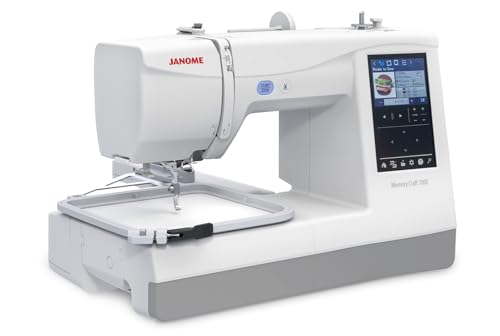
- 274 designs and 11+ fonts for monogramming
- 5.5" x 5.5" embroidery area with touchscreen editing
- Free-arm hoops and thread-management features
Best For: Users who want a compact dedicated embroidery machine for initials and apparel personalization
Brother SE700
Sewing and Embroidery Combo with Wireless Transfer

- 10 lettering fonts and 135 built-in embroidery designs
- Wireless LAN plus Artspira mobile app support
- 4" x 4" field with 3.7" touchscreen editing
Best For: Beginners who want a sewing-and-embroidery combo for small monograms
PooLin EOC03
Beginner Embroidery Machine with Two Hoop Sizes

- Institch system keeps setup and navigation simple
- 4x4 and 4x9.25 embroidery areas for flexibility
- 130 designs, 8 fonts, and WiFi design transfer
Best For: First-time users who want an easy machine for monograms and DIY gifts
Wireless 5x7 Combo
Brother SE2000 Sewing and Embroidery Machine

- 5" x 7" embroidery field for larger monograms
- Wireless LAN and Artspira app support
- 13 fonts and 241 sewing stitches
Best For: Users who want a larger hoop area and wireless design transfer for monogramming
Bundle Pick
Brother SE700 Sewing & Embroidery Machine

- Includes multiple hoops and 40 thread spools
- 4" x 4" embroidery area for names and small designs
- Wireless LAN plus Artspira app support
Best For: Buyers who want a starter bundle with accessories for monogramming
Budget-Friendly Starter
Brother SE600 Sewing and Embroidery Machine

- 4" x 4" hoop for small monograms and names
- 80 designs and 6 lettering fonts
- Automatic needle threader and drop-in bobbin
Best For: Beginners who want a compact combo machine for simple monogramming
Editor’s Choice – Brother PE800 138-Design Embroidery Machine
If you want an embroidery machine for monogramming with a strong mix of lettering and creative flexibility, the Brother PE800 is a practical pick. It combines 11 built-in font styles with a 5″ x 7″ embroidery field, plus USB import support so you can work with more custom designs.
Best For: Monogramming, lettering, and larger home embroidery projects.
Pros:
- 11 built-in fonts, including English, Japanese, and Cyrillic options for monograms and lettering
- 138 built-in embroidery designs for scrollwork, florals, and quilt patterns
- 5″ x 7″ embroidery area suits larger stitched designs
- 3.2″ color touchscreen lets you preview designs before stitching
Cons:
- Embroidery-only machine, so it does not sew garments or seams
- Wired USB design transfer rather than wireless connectivity
The PE800 is a straightforward option if you want monogramming support without extra bells and whistles. Its font selection and larger hoop make it especially useful for personalized gifts, home décor, and name-based projects.
Wireless Pick – Brother PE900 Wireless Embroidery Machine
The Brother PE900 is a smart embroidery machine for monogramming if you value wireless file transfer and mobile design tools. It offers 13 lettering fonts, a 5″ x 7″ embroidery area, and Artspira app support for creating or transferring designs.
Best For: Users who want wireless design transfer and easy personalization.
Pros:
- Wireless LAN and USB support for transferring embroidery files
- 13 lettering fonts, including English, Japanese, and Cyrillic, for personalization
- 5″ x 7″ embroidery field works well for larger designs
- Artspira app access adds mobile design creation and 50 free designs
Cons:
- Embroidery-only machine, not a sewing machine
- Some advanced app features and thread tools are sold separately
For monogramming projects where convenience matters, the PE900 stands out for its wireless workflow and editing options. The larger display, built-in design library, and color-sorting tools make it a strong upgrade for home embroidery users.
Beginner Pick – Poolin EOC05 Beginner Embroidery Machine
If you’re looking for an embroidery machine for monogramming that feels approachable from the start, the Poolin EOC05 is designed with beginners in mind. It includes a 7-inch touchscreen, free design software access, and Wi-Fi or USB transfer options for simple home projects.
Best For: Beginners learning embroidery at home for personal projects and gifts.
Pros:
- Designed specifically for beginners and home DIY users
- 7-inch color touchscreen and simple control system for easier navigation
- Free design software plus Wi-Fi/USB transfer flexibility
- Includes two hoops and a starter kit with thread, stabilizers, bobbins, and needles
Cons:
- Embroidery-only machine, so it does not function as a sewing machine
- Not intended for commercial mass production
The EOC05 is a sensible entry point if you want to learn monogramming without a complicated setup. Its included accessories and guided controls make it well suited to shirts, bags, décor, and handmade gifts.
Compact Pick – Brother PE545 4×4 Wireless Embroidery Machine
The Brother PE545 is a compact embroidery machine for monogramming when you only need a smaller hoop size and easy wireless transfer. It features 10 built-in fonts, a 4″ x 4″ embroidery field, and a 3.7″ touchscreen for simple editing and previewing.
Best For: Small monograms, initials, and beginner-friendly personalization.
Pros:
- Wireless LAN and USB support for transferring designs
- 10 built-in fonts plus 135 embroidery designs for personalization
- 4″ x 4″ embroidery field is suitable for smaller projects
- 3.7″ color touchscreen supports drag-and-drop editing and preview
Cons:
- Smaller hoop size limits larger embroidery projects
- Embroidery-only machine, so it cannot be used for regular sewing
The PE545 makes sense if your monogramming projects stay small and you want a lighter, more compact setup. Its wireless workflow and built-in fonts make it easy to personalize items without a steep learning curve.
Janome Memory Craft 100e – Compact Embroidery Machine for Personalized Monograms
If you want an embroidery machine for monogramming that stays focused on personalization, the Janome Memory Craft 100e is built around embroidery-only convenience. Its 274 built-in designs and 11+ fonts give you plenty of ways to make initials, names, and small decorative accents, while the on-screen editing tools make it easy to resize, rotate, combine, and fine-tune designs before stitching.
Best For: Sewists who want a compact, dedicated embroidery machine for shirts, clothes, and custom monograms.
Pros:
- 274 built-in embroidery designs plus 11+ fonts for 2- and 3-letter monogramming
- 3.5″ touchscreen with on-screen editing like resize, rotate, flip, duplicate, and combine
- Optional free arm hoops help embroider finished garments such as cuffs, onesies, and pant legs
- Optical bobbin monitoring, auto return after thread break, and automatic thread cutting support smoother stitching
Cons:
- Embroidery area is limited to 5.5″ x 5.5″
- Designed as a dedicated embroidery machine, so it does not include sewing functions
Overall, this Janome is a strong pick if your priority is clean personalization rather than a sewing-and-embroidery combo. Its monogram-friendly fonts, editing controls, and free-arm capability make it especially practical for apparel and small custom projects.
Brother SE700 – Sewing and Embroidery Combo with Wireless Transfer
The Brother SE700 is a practical embroidery machine for monogramming if you want both sewing and embroidery in one unit. It includes 10 embroidery lettering fonts, a 4″ x 4″ embroidery field, and wireless options through Design Database Transfer or the Artspira app, making it easy to move and customize designs without relying on a complicated setup.
Best For: Beginners and home users who want a combo sewing machine with simple embroidery personalization.
Pros:
- 10 embroidery lettering fonts and 135 built-in embroidery designs for personalizing projects
- Wireless LAN and Artspira app support for transferring custom designs
- 3.7″ color touchscreen for on-screen editing and design preview
- Includes 8 sewing feet plus an auto needle threader and jam-resistant top bobbin
Cons:
- 4″ x 4″ embroidery field is smaller than many dedicated embroidery machines
- Best suited to light personalization rather than larger monogrammed projects
This is a balanced choice if you want embroidery and sewing in one machine, especially for small monograms and everyday projects. The wireless transfer options and included lettering fonts make it easy to get started with custom work right away.
PooLin EOC03 – Beginner Embroidery Machine with Two Hoop Sizes
If you are shopping for an embroidery machine for monogramming and want something beginner-friendly, the PooLin EOC03 focuses on simple operation and flexible sizing. It includes 130 built-in designs, 8 fonts, WiFi design transfer, and two embroidery areas, so you can start with names and initials and gradually move into larger DIY projects.
Best For: First-time embroidery users who want an easy machine for names, gifts, and home projects.
Pros:
- Beginner-focused Institch system designed for straightforward setup and navigation
- Two embroidery sizes, 4×4 and 4×9.25 inches, add flexibility for personal projects
- 130 built-in designs and 8 fonts for custom names and patterns
- WiFi transfer, tutorials, and one-on-one online support help reduce the learning curve
Cons:
- Font library is smaller than some higher-capacity embroidery machines
- Best for home DIY use rather than heavy-duty or advanced production work
This model is appealing if you want a gentler learning curve and enough space for common monogramming projects. The included starter kit and support resources make it especially practical for someone beginning embroidery at home.
Wireless 5×7 Combo – Brother SE2000 Sewing and Embroidery Machine
If you want an embroidery machine for monogramming that can also handle regular sewing, the Brother SE2000 gives you a bigger 5" x 7" embroidery field, wireless design transfer, and on-screen editing in one computerized package. It is a practical choice if you plan to personalize larger items and want fewer steps between creating a design and stitching it out.
Best For: Sewers and embroiderers who want a larger hoop area, wireless design transfer, and monogramming flexibility in one machine.
Pros:
- 5" x 7" embroidery field supports larger monograms and designs
- Wireless LAN and Artspira app support make design transfer easier
- 13 embroidery fonts and 241 sewing stitches add versatility
- Color Sort and Jump Stitch Trimming help streamline multi-color projects
Cons:
- Higher-capacity setup may be more than casual users need
- Supplied notes indicate US-only 120V use
The SE2000 stands out if monogramming is only part of a bigger sewing-and-embroidery workflow. Its larger field, wireless features, and editing tools make it a strong pick for users who want room to grow.
Bundle Pick – Brother SE700 Sewing & Embroidery Machine
The Brother SE700 is a compact embroidery machine for monogramming that pairs sewing and embroidery in one setup, with a 4" x 4" embroidery area, wireless LAN, and a color touchscreen. This bundle adds multiple hoops, thread, and accessories, which is useful if you want a ready-to-start package instead of buying everything separately.
Best For: Buyers who want an all-in-one starter bundle with hoops, thread, and built-in monogramming support.
Pros:
- Bundle includes multiple hoops and 40 embroidery thread spools
- 4" x 4" embroidery area works well for small monograms and names
- Includes monogramming foot and 135 built-in embroidery designs
- Wireless LAN, Artspira app, and LCD color touchscreen add convenience
Cons:
- Smaller 4" x 4" hoop limits larger embroidery projects
- Bundle contents may be more than needed if you already own accessories
This version of the SE700 is appealing if you want to get started quickly with extras already in the box. It is especially practical for monogramming smaller items and learning the machine without piecing together a separate accessory kit.
Budget-Friendly Starter – Brother SE600 Sewing and Embroidery Machine
The Brother SE600 is a straightforward embroidery machine for monogramming if you want a smaller, easier-to-manage combo machine with solid essentials. It offers a 4" x 4" embroidery field, built-in monogramming support through its included foot, and a touchscreen for previewing designs before you stitch.
Best For: Beginners and budget-conscious shoppers who want a compact sewing and embroidery machine for names and small monograms.
Pros:
- 4" x 4" embroidery field is suitable for simple monograms and small designs
- 80 built-in designs and 6 embroidery lettering fonts add personalization options
- 103 built-in sewing stitches expand everyday sewing use
- Automatic needle threader and drop-in bobbin make setup easier
Cons:
- Smaller embroidery area limits larger monogrammed projects
- Maximum embroidery speed is 400 spm, which is modest compared with larger machines
For basic monogramming, the SE600 covers the essentials without adding unnecessary complexity. It is a sensible pick if you want a proven combo machine for personalizing smaller items and handling regular sewing tasks too.
How We Picked the Best Embroidery Machine for Monogramming
We focused on machines that are practical for monogramming work: clear lettering tools, usable hoop sizes, beginner-friendly controls, and enough built-in designs or font styles to handle names, initials, and small custom orders. We also considered whether a model is embroidery-only or a combo machine, since that affects workflow and value.
Quick Comparison
For simple initials and occasional personalization, a compact model with a 4" x 4" hoop may be enough. If you want larger layouts, more flexible placement, or fewer design splits, look for a bigger embroidery field such as 5" x 7" or larger. Wireless file transfer can also save time if you plan to work with custom monograms often.
Key Buying Factors for an Embroidery Machine for Monogramming
Hoop Size and Embroidery Area
Hoop size matters more than many shoppers expect. Small hoops are fine for initials, but a larger field makes it easier to center names, stack letters, and create cleaner layouts without rehooping as often.
Font Options and Built-In Lettering
Look for machines that include multiple font styles, readable alphabet sets, and good text editing tools. For monogramming, the ability to adjust spacing, rotate designs, and preview placement is especially useful.
Ease of Use
A touchscreen, simple menu navigation, automatic thread features, and clear design transfer methods can reduce setup time. If you are newer to embroidery, a more intuitive interface will help you get consistent results faster.
Embroidery-Only Vs. Combo Machines
An embroidery-only machine can be a smart choice if monogramming is your main goal. Combo sewing and embroidery machines make sense if you also want a general-purpose sewing setup in one unit.
Who Should Buy Which Embroidery Machine for Monogramming?
Beginners who want simple initials and occasional gifts should prioritize ease of use and a smaller learning curve. Home crafters and Etsy sellers usually benefit from a larger hoop and more font flexibility. If you plan to sew and embroider on the same machine, a combo model is the better all-around value. For the best Embroidery Machine for Monogramming, match the hoop size and lettering tools to how often you will actually personalize items.