The right vinyl cutter can help a small business produce decals, labels, apparel graphics, signs, stickers, and personalized products without outsourcing every job. The best choice depends on your material needs, workspace, software comfort, and expected order volume.
This roundup compares 10 machines across compact, beginner-friendly, and wide-format categories, including options with print-then-cut features, bundled software, stands, and starter materials.
Best 10 Vinyl Cutting Machine for Small Business Picks for 2026
Professional Wide-Format Pick

- 24-inch cutting area for larger designs
- Matless cutting plus included light-tack mat
- High-definition cuts with professional features
Best For: Growing businesses handling larger vinyl and sticker orders
Large-Signage Workhorse
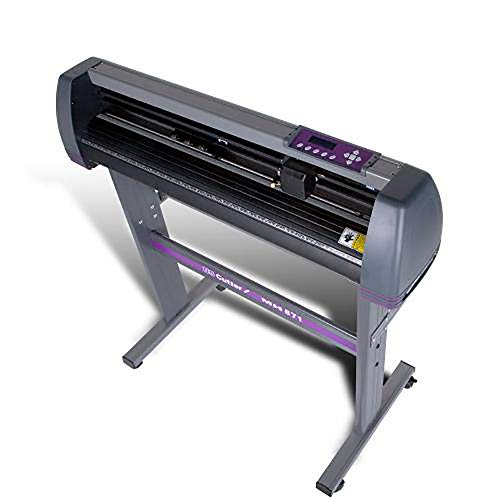
- 34-inch feed width and 30-inch cut width
- Includes stand and VinylMaster Cut software
- Lifetime US-based technical phone support
Best For: Home-based sign, banner, decal, and apparel businesses
Sticker Business Starter

- Includes sticker paper, vinyl, tools, and guidance
- Print Then Cut supports custom printed stickers
- Designed for labels, packaging, and decals
Best For: Beginners launching a sticker or label side business
Adjustable Wide-Format Value

- 34.3-inch maximum media feed width
- Adjustable speed and 20–500g cutting pressure
- Supports SVG and PDF imports via USB or COMPIM
Best For: Wide-format sign, label, craft, and heat-transfer work
Best AI Sticker Maker

- AI voice and text-to-design features
- 8.5-inch cutting width for US Letter materials
- Bluetooth and USB-C connectivity
Best For: Custom stickers, cardstock, and compact craft orders
Best Large-Format Plotter
VEVOR Upgraded 28-Inch Vinyl Cutter

- 28.3-inch maximum paper feed
- Adjustable 10–500 g pressure and 10–800 mm/s speed
- Includes vinyl rolls and starter accessories
Best For: Windows-based signs, labels, and larger vinyl projects
Best Starter Bundle
Silhouette Portrait 4 Vinyl Cutter
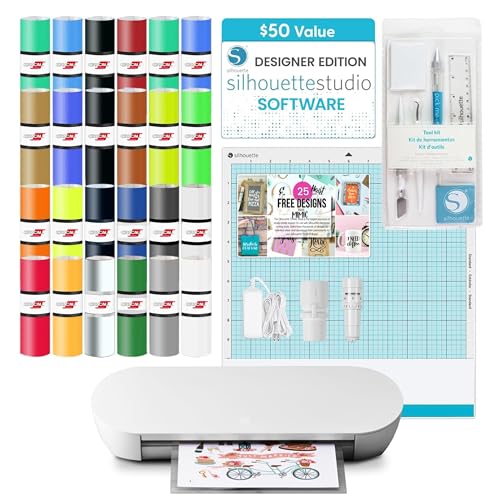
- Includes 24 Oracle vinyl sheets and a tool kit
- 9-inch width with cuts up to 16 feet long
- Bluetooth and Studio Designer Edition access
Best For: Beginners making labels, decals, and compact custom products
Best for Wide-Format Signage

- Large 30.7-inch cutting width
- Adjustable speed and cutting force
- Includes stand, software, and vinyl rolls
Best For: Small businesses making signs, wall graphics, and heat-transfer designs
Best for Compact Multi-Material Work

- Cuts, writes, and scores
- 20,000+ built-in design resources
- Compatible with Mac, Windows, Android, and iOS
Best For: Small businesses making cards, decals, apparel designs, and gifts
Best for Beginner-Friendly Craft Production
Automatic Edge Detection Cutter

- ±0.1 mm stated cutting accuracy
- Supports 100+ materials
- Includes touchscreen, software, and seven materials
Best For: Small businesses making mixed-material crafts, stickers, cards, and apparel
Professional Wide-Format Pick – Siser Romeo 24-Inch Cutter
For a small business that needs a capable vinyl cutting machine for small business work, the Siser Romeo combines a 24-inch cutting area with high-definition detail and matless cutting. Its professional features make it suitable for regular production of vinyl, cardstock, stickers, and related materials.
Best For: Small businesses producing larger vinyl graphics, apparel designs, stickers, and signage with Windows or Mac computers.
Pros:
- 24-inch cutting area supports larger designs and higher production volume.
- Can cut mat-free and includes a 12-by-12-inch light-tack mat.
- Supports Siser HTV and EasyPSV with preinstalled settings, plus cardstock and stickers.
- Offers touchscreen controls, adjustable pinch rollers, variable grit rollers, and commercial-level blades.
Cons:
- Its 36.5-inch width requires substantial workspace.
- At 10 kg, it is less convenient to move than a compact desktop cutter.
The Romeo is a strong fit when production capacity and material flexibility matter more than a small footprint. Wi-Fi compatibility and included Leonardo Design Studio software also support a more streamlined business setup.
Large-Signage Workhorse – USCutter 34-Inch Vinyl Cutter
The USCutter MH Series is a practical vinyl cutting machine for small business owners who want wide-format capacity for signs, banners, decals, and heat-transfer apparel. Its stand, adjustable settings, and included software make it ready for a dedicated home or shop workspace.
Best For: Home-based businesses and sign makers producing wide vinyl graphics, banners, decals, and apparel transfers.
Pros:
- Feeds material up to 34 inches wide and cuts up to 30 inches wide.
- Includes a stand for a dedicated production setup.
- Three adjustable pinch rollers and a dual-roller system support material feeding.
- Includes VinylMaster Cut software and lifetime US-based phone support.
Cons:
- Its 47-pound weight and stand require significant room.
- The product is focused on cutting and does not provide print functionality.
Choose this USCutter when wide-format output and ongoing technical support are priorities. Adjustable speed and pressure provide useful control across signage and heat-transfer projects, while the included software helps with vectorizing and design.
Sticker Business Starter – Cricut Maker 4 Bundle
The Cricut Maker 4 bundle is an approachable vinyl cutting machine for small business beginners focused on stickers, labels, packaging, and small decals. It combines the machine with printable sticker paper, adhesive vinyl, tools, and project guidance for a quicker start.
Best For: New Etsy sellers and small businesses making custom stickers, labels, packaging designs, and everyday decals.
Pros:
- Includes printable sticker paper, adhesive vinyl, tools, and project guidance.
- Print Then Cut works with Cricut Design Space and an inkjet printer.
- Materials are suited to water-resistant stickers, labels, phone cases, and car decals.
- Compatible with computers, mobile devices, and inkjet printers.
Cons:
- Print Then Cut requires a separate inkjet printer.
- The bundle is oriented toward stickers and labels rather than wide-format production.
This is a convenient starting point for product-based businesses that want to create and sell stickers without assembling supplies separately. Its bundle format favors ease of entry, while the included adhesive vinyl expands projects beyond printed stickers.
Adjustable Wide-Format Value – VEVOR 34-Inch Vinyl Cutter
For businesses seeking a wide vinyl cutting machine for small business applications, the VEVOR 34-inch plotter offers adjustable pressure and speed, multiple connection options, and support for common design file formats. It is aimed at signs, labels, decoration, crafts, and heat-transfer work.
Best For: Budget-conscious users cutting wide vinyl, labels, signs, craft materials, and heat-transfer designs on a Windows computer.
Pros:
- Accepts media up to 34.3 inches wide and cuts up to 30.7 inches wide.
- Cutting pressure adjusts from 20 to 500 grams, while speed adjusts from 20 to 800 mm per second.
- Double spring pinch rollers and a roughened steel roller are designed to stabilize feeding.
- Supports USB and COMPIM connections and imports SVG and PDF files.
Cons:
- Supplied compatibility is listed for Windows computers.
- The notes do not specify a warranty.
- Its 43.31-inch depth and stand-height dimensions demand substantial space.
The VEVOR is worth considering when wide material handling and hands-on adjustment are more important than a compact footprint. The included supplies and Signmaster software can help cover common sign-making and craft applications from the outset.
Best AI Sticker Maker – Likcut S41 Vinyl Cutter
If you want a vinyl cutting machine for small business projects that keeps setup simple, the Likcut S41 combines wireless or USB-C connectivity with an app designed for quick, guided workflows. Its 8.5-by-11-inch active area suits US Letter materials, stickers, cardstock, and other compact jobs.
Best For: Small businesses and crafters making custom stickers, labels, cardstock designs, and room-decor projects.
Pros:
- AI-assisted voice and text prompts can turn ideas into ready-to-cut sticker designs.
- Supports Bluetooth 5.0 and wired USB-C connections.
- Offers 0.2 mm accuracy tolerance with automatic path calibration.
- On-machine screen provides status feedback and one-touch Start/Stop and Load/Unload controls.
Cons:
- The maximum cutting width is 8.5 inches, so it is intended for smaller-format work.
- The supplied notes do not indicate support for Mac, Windows, or other specific desktop operating systems.
The S41 is a practical choice when ease of use and sticker-focused automation matter more than large-format production. Its compact working area and guided controls make it approachable for short runs and custom orders.
Best Large-Format Plotter – VEVOR Upgraded 28-Inch Vinyl Cutter
For a vinyl cutting machine for small business work that needs more material capacity, the VEVOR Upgraded 28-Inch plotter provides a wide feed area, adjustable speed and pressure, and bundled vinyl supplies. It is designed for Windows-based sign, label, logo, and decoration projects.
Best For: Windows users producing larger signs, paint masks, labels, logos, and heat-transfer vinyl projects.
Pros:
- Handles material up to 28.3 inches wide, with a maximum cutter width of 24.8 inches.
- Adjustable cutting pressure ranges from 10 to 500 g, and speed ranges from 10 to 800 mm/s.
- Includes five vinyl rolls, a utility knife, holders, blade, and other accessories.
- LCD controls provide direct adjustment of pressure and speed.
Cons:
- It is not compatible with Mac systems.
- At 39 pounds and 38 inches long, it requires substantially more workspace than compact cutters.
- The supplied SignMaster software is intended for Windows systems.
The VEVOR is the stronger fit for businesses that prioritize width and throughput over portability. Confirm that your computer runs a supported Windows version before choosing it, especially if your workflow depends on Mac.
Best Starter Bundle – Silhouette Portrait 4 Vinyl Cutter
The Silhouette Portrait 4 is a compact vinyl cutting machine for small business owners who want a ready-to-use starter package. Its 9-inch cutting width, included Oracle vinyl, design files, tool kit, and Bluetooth connectivity support personalized labels, decals, and craft products.
Best For: New sellers and small businesses making labels, decals, fabric designs, and other compact custom products.
Pros:
- Starter bundle includes 24 Oracle adhesive vinyl sheets, a weeding tool kit, and 25 free designs.
- Includes access to Studio Designer Edition software, listed as a $50 value.
- Cuts materials from 5.5 to 9 inches wide and can handle lengths up to 16 feet.
- Bluetooth, a stable roll feeder, and an automatic crosscutter support convenient workflows.
Cons:
- The 9-inch cutting width is less suitable for large-format signage.
- Some advanced capabilities, such as heat-pen functions, require compatible electric tools.
The Portrait 4 offers a balanced entry point for businesses building a product line around smaller decals, labels, and personalized goods. Its included materials and software access reduce the number of separate purchases needed to begin.
Best for Wide-Format Signage – 34-Inch VEVOR Vinyl Cutter
For a small business that needs a wide-format vinyl cutting machine for small business projects, this 34-inch VEVOR model offers a large working area, adjustable cutting settings, and Windows or Android connectivity. Its steel roller shaft is designed to maintain accuracy across feeds up to 400 inches, while the included stand and materials support a quick start for signage and heat-transfer work.
Best For: Small businesses producing signs, wall graphics, heat-transfer designs, and other larger-format projects.
Pros:
- Large 30.7-inch maximum cutter width and 34.3-inch maximum paper feed.
- Adjustable cutting pressure from 10–500g and speed from 10–800 mm/s.
- Bluetooth Android control plus USB and COM computer connections.
- Includes a floor stand, SignMaster software, five vinyl rolls, and replacement blades.
Cons:
- At 44 pounds and more than 41 inches wide, it requires substantial workspace.
- Compatibility details focus on Windows systems and Android mobile control.
This is the strongest option here for businesses that prioritize cutting width and signage capacity. Its size, stand, and bundled supplies make it more suitable for a dedicated production area than a compact craft desk.
Best for Compact Multi-Material Work – 12-Inch Smart Cutter
This compact vinyl cutting machine for small business use combines cutting, writing, and scoring in one unit. It includes design software without recurring payments, supports common image formats, and connects through USB, Bluetooth, or a USB drive. Its 144-square-inch active area suits decals, cards, apparel details, and other smaller projects.
Best For: Small businesses and home-based sellers creating cards, decals, apparel designs, and personalized gifts.
Pros:
- Cuts, writes or draws, and scores for versatile project production.
- Includes design software with more than 20,000 built-in design resources.
- Supports PNG, JPG, SVG, and TIF files.
- Works with Mac, Windows, Android, and iOS through wired or wireless connections.
Cons:
- The 12-inch model has a smaller active area than wide-format cutters.
- The supplied details do not specify cutting speed or pressure ranges.
Choose this model when flexibility and device compatibility matter more than oversized output. Its compact footprint and no-recurring-payment software can help a small operation handle varied craft orders without investing in a larger plotter.
Best for Beginner-Friendly Craft Production – Automatic Edge Detection Cutter
For a small business seeking a vinyl cutting machine for small business crafts and personalized products, this VEVOR cutter emphasizes guided operation and material flexibility. Automatic edge detection, a color touchscreen, included design software, and seven materials make it practical for producing stickers, cards, apparel projects, and signage.
Best For: Beginners and small businesses handling mixed-material crafts, stickers, cards, and custom apparel projects.
Pros:
- Automatic edge detection and stated accuracy of ±0.1 mm help align cuts to patterns.
- Handles more than 100 materials, including adhesive vinyl, HTV, cardstock, and EVA foam.
- Color touchscreen and 10 adjustable blade-pressure levels support straightforward setup.
- Includes design software, a large image library, and seven materials.
Cons:
- Maximum cut size is 13 by 13 inches, limiting larger designs.
- Listed software compatibility centers on Windows SignMaster and Signcut for Mac.
This model is a balanced choice for a small shop that values material range and ease of use. It offers more guided features than a basic plotter, although businesses producing large signs may need a wider machine.
How We Picked the Best Vinyl Cutting Machine for Small Business
We evaluated these machines against the practical requirements of small shops and side businesses: cutting width, material compatibility, workflow speed, software support, connectivity, ease of setup, and included accessories. We also considered whether each cutter suits occasional custom orders, regular production, or larger signage work.
Because product bundles and specifications can vary, confirm the current package contents, operating-system compatibility, warranty, and support terms before purchasing. A machine that looks inexpensive may require additional blades, mats, software, or transfer supplies.
Quick Comparison
| Best For | Look For | Typical Advantage |
|---|---|---|
| Beginners and sticker sellers | Compact format, simple software, print-then-cut | Lower learning curve and smaller footprint |
| Apparel and craft products | Reliable pressure control and material support | Better results across vinyl, HTV, and cardstock |
| Sign makers | 24- to 34-inch cutting width and stand | Handles larger graphics with fewer panels |
| Growing production shops | Fast workflow, adjustable force, dependable support | More consistent output on repeat orders |
Key Buying Factors for a Vinyl Cutting Machine for Small Business
Cutting Width and Workspace
Choose a compact cutter if you mainly make labels, decals, cards, and small apparel designs. Wider 24- or 34-inch plotters are more suitable for banners, storefront graphics, vehicle lettering, and batch production, but they require more floor and storage space.
Materials and Cutting Control
Check the supported materials and whether the machine offers adjustable blade force, speed, and depth. These controls matter when switching between adhesive vinyl, heat-transfer vinyl, paper, cardstock, stencil film, and thicker specialty materials. A dependable feed system helps preserve alignment on long cuts.
Software and Connectivity
Software can affect productivity as much as the hardware. Confirm support for your computer or mobile device, preferred file formats, and features such as tracing, nesting, weeding lines, and print-then-cut registration. Wi-Fi or Bluetooth can simplify placement, while USB may be more dependable for long production jobs.
Support, Supplies, and Total Cost
Include replacement blades, mats, transfer tape, cutting strips, ink or printer costs for printed stickers, and design-software fees in your budget. Responsive technical support is especially valuable for a first machine or a cutter used for customer orders.
Who Should Buy Which Vinyl Cutting Machine for Small Business?
Choose a compact beginner model if your priority is stickers, labels, small decals, crafts, and an easy setup. Print-then-cut capability is useful for waterproof sticker workflows, provided you already have a compatible printer.
Choose a mid-size cutter if you sell apparel, personalized gifts, classroom products, or mixed-material crafts and need more flexibility than a basic desktop machine.
Choose a 24- to 34-inch plotter if your business produces signs, window graphics, vehicle lettering, banners, or larger vinyl runs. A stand and included design software can improve the workflow, but verify that the machine fits your available space.
Prioritize support and repeatability when customer deadlines matter. The fastest machine is not always the best value if setup is difficult or replacement supplies are hard to find. Match the cutter to your current products, then leave room for the materials and order volume you realistically expect to add.